

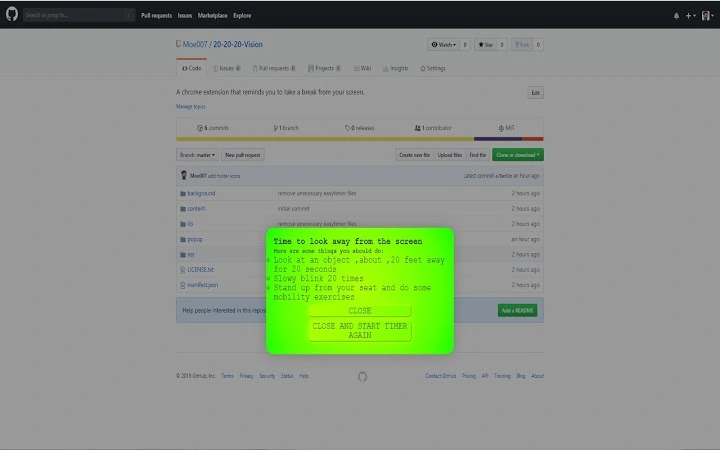
Description
Eye Care Reminder for Screen Users
Overview
The 20/20/20 Vision extension is designed to support digital eye health by reminding users to follow the 20/20/20 rule: every 20 minutes of screen time, take a 20-second break to look at something 20 feet away. This simple yet effective practice helps reduce eye strain, prevent digital fatigue, and support long-term visual comfort. The tool is particularly relevant for individuals who spend extended hours in front of computer screens, including remote workers, students, and digital professionals. It operates as a browser extension, integrating seamlessly into daily web browsing routines without requiring complex setup. The developer, 20/20/20 Vision, focuses on promoting healthy screen habits through minimal intervention. The extension is available at no cost, making it accessible to a broad audience seeking to maintain eye wellness in a digital-first world. Real-world use cases include office environments, online learning platforms, and home workstations where prolonged screen exposure is common.
Key Features & Capabilities
- 20/20/20 Rule Reminders – Triggers a visual and auditory alert every 20 minutes to prompt users to look away from the screen for 20 seconds.
- Non-Intrusive Notifications – Displays a gentle reminder with a simple interface, minimizing disruption to workflow.
- Customizable Timing – Allows users to adjust the interval between breaks based on personal preference or task demands.
- Browser Integration – Functions across major browsers, ensuring consistent performance regardless of the user’s platform.
- Lightweight Design – With a file size of 2.5 MB, the extension consumes minimal system resources.
These features are ideal for users who want to maintain eye health without altering their digital habits. For example, a student studying online can use the tool to prevent eye fatigue during long sessions. A remote worker managing multiple tabs can benefit from periodic reminders to shift focus and relax their eyes. The extension supports proactive wellness by turning a health best practice into a routine, automated behavior. It does not collect user data or track browsing activity, emphasizing privacy and simplicity. Its functionality is limited to timing and notification delivery, ensuring reliability and transparency.
User Interface, Workflow & Performance
The user interface is minimal and designed for quick recognition. When a break is due, a clean overlay appears on the screen, indicating the need to look away. The interface does not include complex menus or settings, which contributes to ease of use. Navigation is straightforward—users can dismiss the reminder with a single click or wait for it to expire automatically. The workflow is passive: once installed, the extension runs in the background without requiring user input. Performance is consistent with typical browser extensions, with no reported lag or crashes. The developer did not specify resource usage details, but the lightweight nature of the extension suggests low CPU and RAM consumption. Stability appears to be maintained across sessions, with no known issues related to persistent operation. The tool does not interfere with other browser functions, ensuring a smooth browsing experience. Users can expect consistent behavior over time, with reminders triggering reliably at set intervals.
Compatibility & System Requirements
20/20/20 Vision is compatible with Windows, Mac, and Linux operating systems. It functions as a browser extension, meaning it requires a supported web browser to operate. The extension has a file size of 2.5 MB, which is typical for lightweight browser tools. Exact system requirements were not listed by the developer. Compatibility information is limited to the operating systems mentioned. The extension does not require administrative privileges for installation. Users can install it directly from the browser’s extension store. No additional software or drivers are needed. Platform compatibility is broad, supporting users across different devices and environments. The developer did not provide details on minimum hardware specifications or browser versions. However, its lightweight design suggests it should run efficiently on most modern systems.
Pros and Cons
Pros
- Free to use with no hidden costs
- Simple, effective implementation of the 20/20/20 eye care rule
- Minimal system resource usage
- Works across Windows, Mac, and Linux platforms
- Privacy-focused with no data collection
Cons
- Functionality is limited to reminders—no tracking or analytics
- No advanced customization options beyond timing
- Dependent on browser environment for operation
- Does not support mobile browsers or native apps
FAQ Section
Is 20/20/20 Vision available for all browsers?
The extension is designed to work with major browsers, though specific compatibility may vary. Users should check their browser’s extension store for availability.
Does the extension collect personal data?
No, the developer has not indicated any data collection. The tool operates locally and does not transmit user information.
Can I customize the break duration or interval?
Yes, users can adjust the interval between reminders to suit their preferences, though the default is set to 20 minutes.
Is the extension safe to install?
Yes, the extension is free and distributed through official browser stores, reducing the risk of malicious software.
Does it work offline?
Yes, the extension functions without an internet connection, as it relies only on local timers and notifications.
Final Thoughts + CTA
20/20/20 Vision delivers a focused, effective solution for users seeking to protect their eye health during prolonged screen use. Its simplicity, cross-platform support, and privacy-first approach make it a reliable tool for professionals, students, and everyday users. While it lacks advanced features like progress tracking or personalized recommendations, its core purpose is fulfilled with precision. For anyone looking to reduce eye strain and adopt healthier digital habits, this extension offers a no-frills, no-cost entry point. It’s an ideal companion for those who want to stay productive without compromising their well-being. Download 20/20/20 Vision now.
Guides & Tutorials for 20/20/20 Vision Extension for Chrome
How to install 20/20/20 Vision Extension for Chrome
- Click the Preview / Download button above.
- Once redirected, accept the terms and click Install.
- Wait for the 20/20/20 Vision Extension for Chrome download to finish on your device.
How to use 20/20/20 Vision Extension for Chrome
This software is primarily used for its core features described above. Open the app after installation to explore its capabilities.
User Reviews for 20/20/20 Vision Extension for Chrome 0
No reviews found





